The following support article will guide you through setting up a HART Test System (FCG TK20192) for the first time and reference troubleshooting topics for this tool.
Hardware Setup
Connect a power cord (supplied) to a 120/220VAC outlet. (Figure 1, A).
Connect a registered RS-232 HART modem between the Serial Port marked “RS232-0” (Figure 1, B) on the HART Test System and the HART communication terminals of the device to be tested. This port is used by the HART Master to communicate with the device.
Connect a keyboard, mouse, and monitor (these items are not supplied) (Figure 1, C).
Connect a registered RS-232 HART modem between the Serial Port marked “RS232-1” (Figure 1, D) on the HART Test System and the HART communication terminals of the device to be tested. This port is used by the HSniffer to capture and analyze the data on the FSK bus between the HART Master and the device.

Figure 1 (Serial Numbers 98600100 - 98600319)
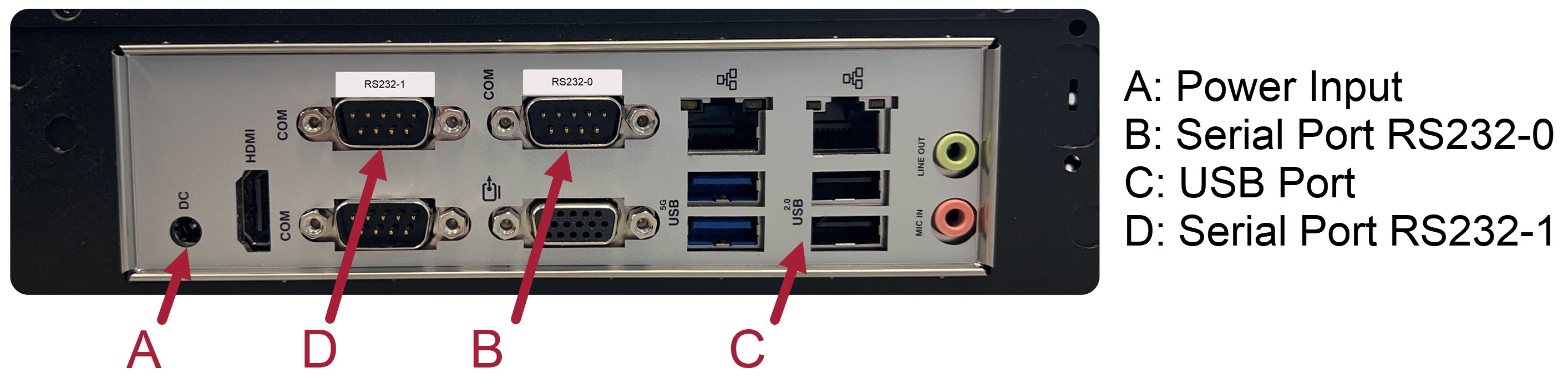
Figure 2 (Serial Numbers 98600320 and above)
Power up the test system using the button on the front of the test system.
Software Updates to HART Test System
Before proceeding with the installation, please reboot the HTS. This would ensure that if any test tools are left running inadvertently, they are terminated before the software update is installed.
Please refer to the installation steps provided with the software update.
Running Tests on the HART Test System
On the login screen, select user1 from the drop-down list for username and enter user1 in the password field.
Read the GettingStarted.txt document on the Desktop for guidance on best practices for how to run tests on the HART Test System.
HART Test System Utilities
Several useful commands are available on the HART Test System that can be run from any user (sub)directory by typing them on the terminal prompt -
Utility | Description |
BURSTOFF | Disables burst mode in the DUT. ([Not sure if the next part is needed since rundll etc invoke this internally -VG] Since the compliance assessors require that burst mode is off when testing begins, BURSTOFF should be used before starting a test run (e.g., rundll)). Note: The DUT must be connected to the HART Test System via FSK to use this utility. |
| hartip_status | Displays the current status of HART-IP environment settings used to test HART-IP devices. |
kit192ver | Displays the current version number of the HART Test System (i.e., KIT-192). |
lscalscr | Lists the implemented Common Practice Command (CAL) test automation. |
lsdllscr | Lists the implemented Token-Passing Data-Link Layer (DLL) test automation. |
| lshipscr | Lists the implemented HART-IP Server (HIP) test automation. |
lsualscr | Lists the implemented Universal Command (UAL) test automation. |
| mkgtwy | Creates a "gateway" file in user's Home directory if the pre-installed file is lost for any reason. This file is used for running Application Layer tests wirelessly via a commercial gateway and must be edited before use. |
| mkhipcfg | Creates a "hipcfg.txt" file in user's Home directory if the pre-installed file is lost for any reason. This file is used for running tests via HART-IP on HART-IP devices and must be edited before use. |
| pollTheDUT | Polls a DUT with Commands 2 and 3. It is used to meet the testing requirement found in the HCF_TEST-011 FCG TT20011 TP-DLL Master (Alternate) Test Specification. Note: The DUT must be connected to the HART Test System via FSK to use this utility. |
provision | Configures the Network ID, Join Key, Long Tag and Polling Address on the DUT prior to running tests on it. It displays the current value of each of these parameters in turn (except the Join Key, which cannot be queried) and allows a new value to be entered. Pressing <Enter> without entering any value leaves the current value unchanged. Note: The DUT must be connected to the HART Test System via FSK to use this utility. The Network ID and Join Key are required only for WirelessHART devices. |
runcal | Runs all implemented CAL tests via FSK and summarizes the test results. |
| runcalh | Runs all implemented CAL tests via HART-IP and summarizes the test results. |
runcaludp | Runs all implemented CAL tests wirelessly via a commercial gateway and summarizes the test results. |
| runcalw | Runs all implemented CAL tests wirelessly via the WirelessHART Access Point and summarizes the test results. Note: Tests need not be run wirelessly via both a commercial gateway and the Access Point. |
| runcalwburst | Runs all implemented CAL burst tests wirelessly via the WirelessHART Access Point. Note: These tests fail when run via commercial gateways that do not support Command 533. |
rundll | Runs all implemented DLL tests (see Section 2.1) via FSK and summarizes the test results. Note: DLL039A takes several weeks to complete and should be run after the Application Layer tests have been successfully completed. Until then, users should abort DLL039A when prompted. |
| rundllh | Runs DLL039A and DLL039B via HART-IP and summarizes the test results. |
rundlludp | Runs DLL039A and DLL039B wirelessly via a commercial gateway and summarizes the test results. |
| rundllw | Runs DLL039A and DLL039B wirelessly via the WirelessHART Access Point and summarizes the test results. Note: Tests need not be run wirelessly via both a commercial gateway and the Access Point. These tests are best run via a commercial gateway due to their long test duration. |
| runhip | Runs all implemented HART-IP Server tests via HART-IP and summarizes the test results. |
| runiosys | Starts the hipserver and hipiosys applications to run Application Layer tests wirelessly via a commercial gateway. It terminates if a wireless device with Long Tag "HART-DUT" has not joined the gateway's network. |
| runnmgw | Starts the hipserver and hipnmgw applications to run Application Layer tests wirelessly via the WirelessHART Access Point. It terminates if a wireless device does not join the network within the timeout period (500s) or if it encounters any other error. |
| runTPMT | Executes, in order, the Data Link Layer tests that are needed to assure compliance with the HART TP-DLL Master (Alternate) Test Specification requirements. Note: The DUT must be connected to the HART Test System via FSK to use this utility. |
| runtp | Starts the hipserver and hiptp applications to run Application Layer tests via FSK. |
runual | Runs all implemented UAL tests via FSK and summarizes the test results. |
| runualh | Runs all implemented UAL tests via HART-IP and summarizes the test results. |
runualudp | Runs all implemented UAL tests wirelessly via a commercial gateway and summarizes the test results. |
runualw | Runs all implemented UAL tests wirelessly via the WirelessHART Access Point and summarizes the test results. Note: Tests need not be run wirelessly via both a commercial gateway and the Access Point. |
| set_timezone | Sets the timezone on the HART Test System based on the selected (local) time zone. |
showhipapp | Displays what HART-IP server application (if any) is currently running (e.g., hiptp, used to run Application Layer tests via FSK). |
| start_hartip | Activates the test environment settings to run HART-IP tests on HART-IP devices. Note: This must not be invoked if testing HART or WirelessHART devices as the settings may interfere with testing. |
| stop_hartip | Disables the test environment settings used for testing HART-IP devices. Note: This may be invoked before testing HART or WirelessHART devices to ensure that there are no settings inadvertently activated for HART-IP. |
summarizecal | Summarizes results of all CAL tests run via FSK into one file. The name of the summary file is printed on the screen. Only the test logs in the current directory, from which the command is invoked, are examined. |
| summarizecalh | Summarizes results of all CAL tests run via HART-IP in one file. The name of the summary file is printed on the screen. Only the test logs in the current directory, from which the command is invoked, are examined. |
summarizecaludp | Summarizes results of all CAL tests run wirelessly via a commercial gateway in one file. The name of the summary file is printed on the screen. Only the test logs in the current directory, from which the command is invoked, are examined. |
| summarizecalw | Summarizes results of all CAL tests run wirelessly via the WirelessHART Access Point in one file. The name of the summary file is printed on the screen. Only the test logs in the current directory, from which the command is invoked, are examined. |
summarizedll | Summarizes results of all DLL tests run via FSK in one file. The name of the summary file is printed on the screen. Only the test logs in the current directory, from which the command is invoked, are examined. |
| summarizedllh | Summarizes results of all DLL tests run via HART-IP (i.e., DLL039A and DLL039B) in one file. The name of the summary file is printed on the screen. Only the test logs in the current directory, from which the command is invoked, are examined. |
summarizedlludp | Summarizes results of all DLL tests run wirelessly via a commercial gateway (i.e., DLL039A and DLL039B) in one file. The name of the summary file is printed on the screen. Only the test logs in the current directory, from which the command is invoked, are examined. |
| summarizedllw | Summarizes results of all DLL tests run wirelessly via the WirelessHART Access Point (i.e., DLL039A and DLL039B) in one file. The name of the summary file is printed on the screen. Only the test logs in the current directory, from which the command is invoked, are examined. |
summarizehip | Summarizes results of all HART-IP Server tests run via HART-IP in one file. The name of the summary file is printed on the screen. Only the test logs in the current directory, from which the command is invoked, are examined. |
summarizeual | Summarizes results of all UAL tests run via FSK in one file. The name of the summary file is printed on the screen. Only the test logs in the current directory, from which the command is invoked, are examined. |
| summarizeualh | Summarizes results of all UAL tests run via HART-IP in one file. The name of the summary file is printed on the screen. Only the test logs in the current directory, from which the command is invoked, are examined. |
summarizeualudp | Summarizes results of all UAL tests run wirelessly via a commercial gateway in one file. The name of the summary file is printed on the screen. Only the test logs in the current directory, from which the command is invoked, are examined. |
| summarizeualw | Summarizes results of all UAL tests run wirelessly via the WirelessHART Access Point in one file. The name of the summary file is printed on the screen. Only the test logs in the current directory, from which the command is invoked, are examined. |
| terminateserver | Terminates the HART-IP server and application, if running. Note: The DUT must be connected to the HART Test System via FSK to use this utility. Run showhipapp before invoking this to see what is running. |
testcal | Runs all implemented CAL tests via FSK and summarizes the test results. |
testcalw | Runs all implemented CAL tests wirelessly via the WirelessHART Access Point and summarizes the test results. |
testdll | Runs all implemented DLL tests (except DLL039A-B) via FSK and summarizes the test results. DLL039A and DLL039B must be manually invoked after the DUT has successfully completed the Application Layer tests. |
testdllw | Runs DLL039A and DLL039B wirelessly via the WirelessHART Access Point and summarizes the test results. |
testual | Runs all implemented UAL tests via FSK and summarizes the test results. |
testualw | Runs all implemented UAL tests wirelessly via the WirelessHART Access Point and summarizes the test results. |
| UNIV-HT | Runs a sample Host Application executing within the HTest environment. It allows Universal Commands to be communicated to the connected device and displays the device's response. Note: The DUT must be connected to the HART Test System via FSK to use this utility. |
Additional Resources
For more, see the documentation: HART Test System Documentation
Was this article helpful?
That’s Great!
Thank you for your feedback
Sorry! We couldn't be helpful
Thank you for your feedback
Feedback sent
We appreciate your effort and will try to fix the article